

A sudden production incident took down the user authentication system: gateways threw 502 Bad Gateway, while the auth service (Casdoor) returned persistent 503 Service Unavailable. Checking the root partition with df -h showed only 40% disk utilization, with 55GB of free space remaining. Yet system calls across the host crashed with no space left on device (ENOSPC). The culprit was a 6-month-old legacy PHP container. Bypassing broken garbage collection and battered by anonymous crawlers, it quietly generated 5.71 million zero-byte session files in a single flat directory, devouring all 6.35 million inodes available on the host filesystem.
Symptoms and False Leads #
Early morning alerts and user reports arrived simultaneously: users could not log in to the production application portal (portal.example.com).
The preliminary inspection presented three conflicting observations:
- Read-heavy business endpoints remained healthy: The primary API gateway access logs showed the vast majority of read queries succeeding with
200 OK. Application processes were running normally. - Authentication refreshes collapsed: Any attempt to log in, refresh token claims, or fetch user roles hit an immediate
502 Bad Gatewayfrom the gateway. - Multiple healthy containers were marked unhealthy: Running
docker ps -arevealed that more than four core AI worker containers on the host were simultaneously flagged asUp 4 days (unhealthy).

In a microservice environment, seeing a cluster of core containers turn unhealthy often triggers a knee-jerk reaction: restart them. Had we restarted these containers, the daemon would have failed to recreate namespaces and runtime configs, turning a transient authentication degradation into an irrecoverable multi-service outage.
Inspecting the raw Docker healthcheck error on one of the failing containers:
|
|
Notice the failure boundary: this was dockerd on the host side invoking runc exec to run the in-container probe script. Prior to entering container namespaces, runc must write serialized process states and temporary JSON descriptors to the host’s /tmp directory. The service inside the container was actively processing traffic, but the external healthcheck probe crashed before even entering the container. This decoupling between probe execution mechanics and actual workload health reflects a classic failure mode analyzed in 《https://blog.baifan.site/en/distributed-system-heartbeat-mechanism/》.
Tracing the Chain: The “Free Space” Paradox #
Tracing the login request flow downstream through the reverse proxy logs:
|
|
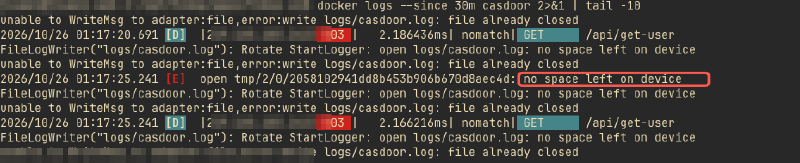
The causal link closed: Casdoor attempted to write temporary tokens and rotate its access log, failed with no space left on device, and responded with 503. The User Management Service caught the upstream error, and the edge gateway terminated the connection with 502.
Yet running standard capacity checks on the host produced contradictory output:
|
|
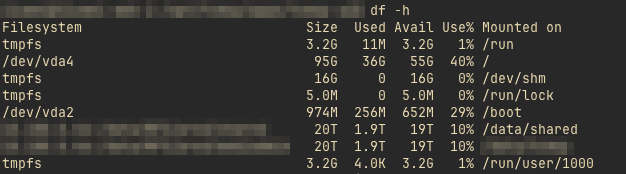
The root partition had 55GB of free space, sitting at 40% disk capacity. Standard disk utilization alerts (thresholded at 85% or 90%) remained completely silent. When metrics look spotless while business functions crumble, teams encounter the observational blind spot detailed in 《https://blog.baifan.site/en/ai-mttr-mtbf-resilience-psychosis/》.
Inode Exhaustion: Isolating the Metadata Consumer #
Under Linux and POSIX filesystem specifications, allocating a new file requires two distinct physical resources:
- Data Blocks: To store the payload bytes;
- Index Nodes (Inodes): To store file metadata (permissions, ownership, timestamps, byte size, and block pointers).
Exhausting either resource causes the kernel open(..., O_CREAT) or creat() system call to fail with ENOSPC.
Running df -i on the root partition revealed the reality:
|
|

All 6,356,992 inodes were exhausted: IFree = 0. With zero remaining inodes, any operation attempting to create files on the root filesystem failed immediately—including pipeline commands like sort that spill large intermediate sets to temporary storage.
Locating the directory responsible for the metadata drain:
|
|
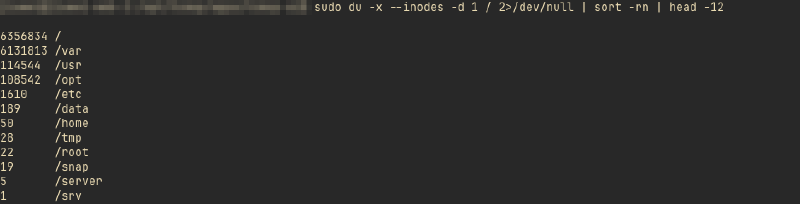
The /var directory alone held 6.13 million inodes (96.5% of the system total).
Drilling down into the Docker storage subdirectories:
|
|
Over 90% of the entire host’s inodes were concentrated inside a single anonymous volume: 073a7d1a....
Inspecting directory entries within the volume:
|
|
A total of 5.71 million files sat in a single flat directory. All were named sess_*, owned by www-data, and virtually every file was 0 bytes.
Identifying the attached container:
|
|
The volume belonged to lsp_old, an unmanaged legacy PHP 5.4 container running untouched for six months.
Because standard tools relying on disk buffering could fail, we used an in-memory awk hash table to aggregate file creation timestamps:
|
|
| Time Range | File Count | Percentage | State & Nature |
|---|---|---|---|
| >30 Days Ago (Apr ~ Sep) | 4,856,271 | 85.0% | Dead legacy files |
| 7 ~ 30 Days Ago | 687,633 | 12.0% | Expired sessions |
| Within 7 Days | ~166,000 | 2.9% | Recent empty sessions |
| Last 24 Hours | 0 | 0.0% | Frozen since Oct 25 09:14 (inode ceiling hit) |
The math revealed that the container generated approximately 32,000 empty session files daily (one new file every 2.7 seconds). Because web vulnerability scanners and crawlers do not retain cookies across probes, each incoming request without a PHPSESSID forced PHP’s session_start() to allocate a new zero-byte session file. None of these sessions were ever populated with data or explicitly destroyed.
Root Cause: Why Native PHP Session GC Broke Down #
PHP features built-in Session Garbage Collection. How did 5.71 million files accumulate over six months without ever being pruned?
This was the result of a triple failure: probabilistic GC design bottlenecks, $O(N)$ directory traversal overhead, and containerized operational mismatches.
1. Probabilistic GC Collapse Under High Directory Cardinality #
PHP’s native file-based session cleanup does not run in an asynchronous background daemon. Instead, it hooks into standard incoming HTTP worker processes.
GC triggering is determined by configuration probability:
$$\text{Trigger Probability} = \frac{\text{session.gc\_probability}}{\text{session.gc\_divisor}}$$The default ratio is typically $1 / 1000$. When a request hits that 0.1% chance, the single-threaded PHP worker executes the following:
- Calls
opendir()onsession.save_path; - Iterates sequentially through every entry in the directory;
- Executes a
stat()syscall on each file to retrieve itsmtime; - Compares
current_time - mtimeagainstsession.gc_maxlifetime(defaulting to 1440s / 24m) and invokesunlink()if expired.
As explored in 《https://blog.baifan.site/en/git-add-silent-failure-stat-cache-plumbing/》, metadata operations against millions of filesystem entries impose severe I/O penalties. With 5.71 million files in a single flat directory, scanning entries and issuing millions of stat() calls takes dozens of minutes—vastly exceeding PHP’s max_execution_time (default 30 seconds).
The outcome was an unrecoverable loop: Whenever GC was triggered, the PHP worker process was killed by a SIGTERM timeout before scanning more than a fraction of the directory. Concurrent requests triggering GC choked on storage I/O, and the cleanup procedure stalled completely.
2. Containers Broke the Linux Distribution Contract #
In Debian and Ubuntu official PHP distributions, maintainers historically disabled probabilistic GC in php.ini to protect web traffic from sudden I/O latency spikes:
|
|
The distribution architecture assumed cleanup would be handled by an asynchronous system cron job (/etc/cron.d/php), running hourly as root to purge /var/lib/php/sessions.
Packaging this software stack into Docker violated every operational assumption:
- Inside the container: Only Nginx and PHP-FPM ran in the foreground. No
cronorsystemddaemon existed. - Outside on the host: The host’s cron job only scanned
/var/lib/php/sessionson the host, blind to isolated Docker volume directories. - Configuration oversight: The legacy image retained
session.gc_probability = 0without container-specific overrides.
A complete administrative vacuum: PHP did not trigger GC, the container had no scheduler, and the host could not see the volume. Over 180 days, 5.71 million files silently consumed all available filesystem inodes.
Remediation and Mitigation #
With zero remaining inodes, no temporary files could be allocated. Recovery commands had to execute in-place with strict memory safety.
Phase 1: Emergency Relief (Executed) #
When handling millions of files, executing rm -rf * fails. Bash attempts to expand the wildcard before invoking the binary. Passing 5.71 million arguments breaches the Linux kernel’s ARG_MAX buffer (typically 2MB to 4MB), throwing Argument list too long.
Instead, we used an in-kernel streaming unlink:
|
|
Engineering considerations:
- Direct
unlink()syscalls: The-deleteaction invokesunlink()directly inside the traversal loop, bypassing shell argument expansion and process forking; - Safe temporal boundary: Purging files older than 30 days (4,856,271 files) freed 76% of all system inodes while ensuring zero risk to potentially active sessions;
- Idempotency: The command can be paused or re-run safely at any time.
Post-cleanup inode state:
|
|
Root partition inode utilization dropped from 100% to 24%, restoring 4.85 million inodes. Casdoor resumed log rotation and token creation immediately. The authentication layer recovered without requiring a service restart.
Phase 2: Permanent Architectural Fixes #
For the legacy lsp_old container:
- Decommissioning: Inspection confirmed the PHP 5.4 container was an unmaintained transition service whose functionality had been subsumed by new services. After verification, the container was stopped and its anonymous volume deleted, recovering the remaining 850,000 files.
- Fallback pattern for required legacy workloads:
- Centralized Session Storage (Recommended): Reconfigure PHP to use Redis (
session.save_handler = redis). Redis key expirations (TTL) handle session lifecycle automatically in memory, decoupling session state from the host filesystem. - Host-level Pruning: If file storage is unavoidable, install a host-level systemd timer:
1find /var/lib/docker/volumes/<vol_id>/_data -maxdepth 1 -name 'sess_*' -mtime +3 -delete
- Centralized Session Storage (Recommended): Reconfigure PHP to use Redis (
Architectural Takeaways #
This incident illustrates how low-level technical debt can breach modern microservice architectures. Hardening systems requires four defensive improvements:
1. Inode Metrics Are Mandatory #
Relying solely on df -h for storage monitoring creates a catastrophic blind spot. Systems running log rotation, caching layers, session stores, or build directories frequently run out of inodes long before exhausting block capacity.
Prometheus Node Exporter configurations must include explicit inode utilization rules:
|
|
2. Beware of Healthcheck Failure Cascades #
Docker’s HEALTHCHECK executes runc exec, which depends on host storage to construct temporary namespace descriptors. When the underlying host runs out of resources, healthcheck probes fail before business workloads do.
Automated orchestration recovery mechanisms (such as auto-restarting unhealthy containers) should incorporate circuit breakers. When multiple containers report simultaneous healthcheck degradation, operators must evaluate shared host resources (inodes, file descriptors, PID limits) before cycling workloads.
3. Regulate Anonymous Volume Allocations #
Prevent unmanaged anonymous volumes in production. Without explicit naming and project tags, anonymous volumes quickly become unowned waste dumps. All stateful storage must use named volumes or audited host bind mounts with defined retention policies.
4. Retire Unowned Systems Aggressively #
A neglected PHP 5.4 container generated 32,000 empty files daily, spending six months exhausting the host’s filesystem capacity. Service decommissioning must adhere to the same rigor as service deployment: shutting off traffic must be followed immediately by reclaiming compute and storage resources.
Appendix: Inode-Exhaustion-Safe Read-Only Commands #
When inodes are fully exhausted and the system refuses all disk writes, use these read-only commands (which operate without temporary files):
|
|