
Let me start with something that actually happened.
In early 2025, I added a feature to an internal system: export to Excel. Small requirement — I didn’t even write it up, just typed “add an export button to the list page” into the chat box.
The AI delivered in ten minutes. Frontend changes, new endpoint, SQL — all in one pass. I was pleased when I opened the PR, right up until review revealed: the export columns didn’t match the list page, a hundred thousand rows would hang the service outright, there was no permission check, and the tests only covered the happy path.
The code ran, the tests were all green, and the AI said it was done. The delivery was a failure.
Later I tried again. Same requirement, but this time we confirmed up front which columns to export, how to handle large data volumes, and who had permission; wrote it into a document before starting; split it into three independently acceptable small tasks; and finally had a human review it against the original requirement. The first pass was indeed slower, but later maintenance and handoffs to other people were far sturdier.
Both runs used the same model. The gap wasn’t the model.
Vague Wishes, and AI Fills In the Default Answers #
The mistakes I made early on, most people have probably made too.
“Help me refactor this module.” The AI rewrote code that used to be readable into something even I couldn’t read.
“Add tests.” It wrote a pile of tests, all testing the happy path. Edge cases? Exception paths? Nobody asked, and it didn’t ask either.
“Fix this bug.” It really did fix it — without touching the root cause, so the same bug came back with different input.
The most absurd one: I asked the AI to “clean up this function”, and it compressed 30 lines of code into 8. “Much more concise.” Concise, sure — readability zero. When someone else took it over later, they spent half a day figuring out what those 8 lines did.
The common thread: I made a vague wish, and the AI filled in all the default answers. Default answers fail very politely — the code compiles, the tests pass, no errors anywhere.
The Question the Process Article Didn’t Answer: Who Enforces It #
Later I read an article on AI workflows: “From AI Writing Code to AI Workflows”.
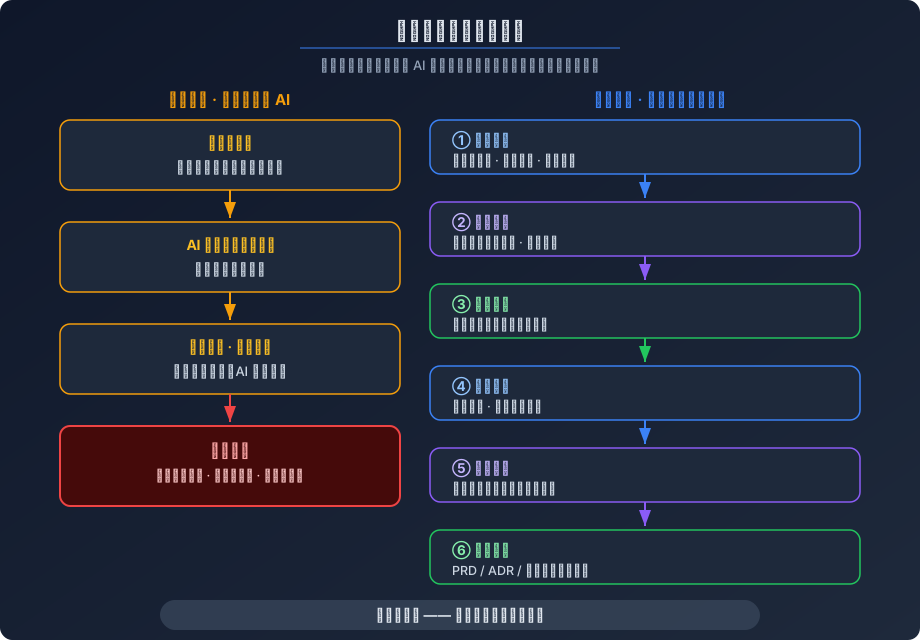
The article says: for the same requirement, the “just let AI write it” path and the “align first, then act” path use the same model. The gap is process: requirement alignment, design decisions, task breakdown, incremental implementation, independent review, knowledge handoff — six stages, and skipping any one invites trouble.
I agree. But reading it left me with a question: the article says “have six stages” — and then what? Who enforces them?
Self-discipline? Reciting “today I will follow the six stages” every morning before starting work? Or an internal document nobody actually reads?
I pushed the question to its limit: if a process doesn’t become something executable, it’s just a wish list. AI doesn’t need a wish list. AI needs instructions precise down to the line.
dev-skills: Turning Stages Into Loadable Rules #
So I wrote ByronFinn/dev-skills — a skill set following the standard skill specification. Load it into the AI, and it knows the rules.
I won’t repeat the feature list and install instructions; an earlier review piece covered them. Here are just three design decisions:
First, every skill is plain text. SKILL.md is the entry instruction, REFERENCE.md is the detailed process, and format templates live in separate files. No runtime, no scaffolding, no extra dependencies. The rules themselves are text; the loading mechanism is the platform’s business — the skill loading and execution mechanics piece took that apart.
Second, every skill fills a specific hole. The 12 skills cover concept to release, and each stands on its own. Six of the core ones:
/thinkdiverges on the idea, then converges into a decision-complete PRD: goals, options, acceptance criteria, technical decisions, and an explicit list of what we won’t do./grillis an adversarial read that corners every open question, fuzzy assumption, and undefined term — no pass until they’re resolved./storydoes vertical slicing, breaking the plan into small tasks that can be executed and accepted independently. Test cases written from horizontal slices test behavior you imagined./tddis subagent-orchestrated test-driven development, one cycle per acceptance criterion./reviewis three-way parallel review: test, code, and impact, each audited independently by a subagent; reports are merged, contradictions are not auto-resolved — a human adjudicates./researchgathers from authoritative sources (official docs, source, specs) into versioned, immutable records; a major-version update opens a new file, and old files are permanently frozen.
Third, the rules aren’t written for humans — they’re written for the AI loader. Some will say this is just “good engineering practice” written down as documentation. Yes — and the point isn’t “well written”; the point is that once loaded, the AI obeys the rules.
Same Requirement, Walked Twice: Before and After the Rules #
Back to the “export to Excel” from the beginning.
With the skills loaded, I no longer say “add an export button”. /think kicks off and the AI starts asking: which columns to export? How to handle large data volumes? Permissions? Concurrency? /grill comes in for the adversarial read, and phrases like “large data volume” don’t pass: a hundred thousand? A million? A thousand? No pass until it’s pinned down. /story slices it into three tasks: basic export for small data, async export with a download link for large data, and permission checking — each independently acceptable. Under /tdd, a missing permission check gets caught by its own test cases, not by luck. Finally /review runs the three-way parallel pass, and contradictions go to a human to judge.
The same “export to Excel”, AI-written code both times. The first run rode on wishing; the second ran on rules.
Isolation via Process Boundaries, Not Subagent Goodwill #
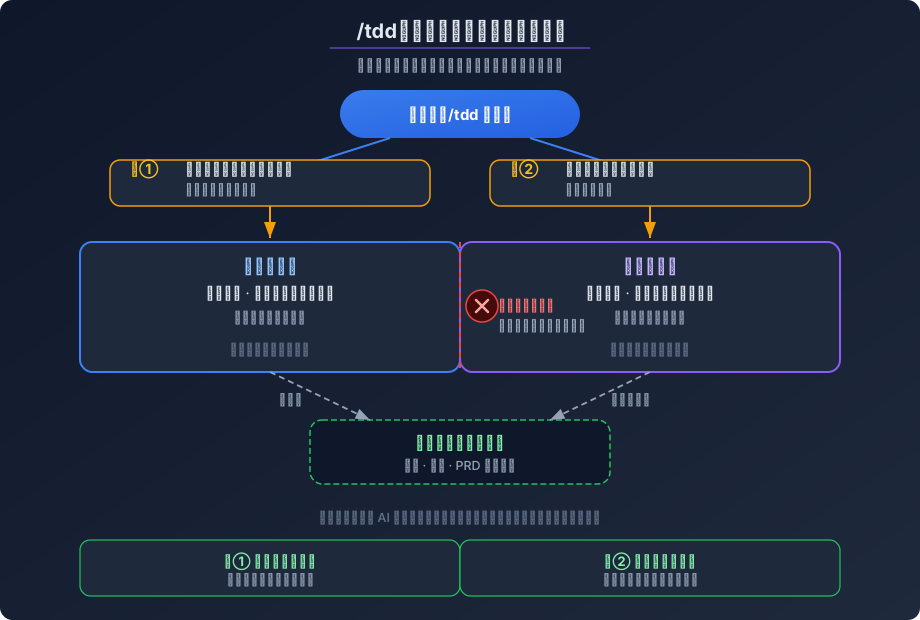
The core design of /tdd and /review is subagent orchestration: the test subagent and the development subagent are two separate processes, each starting from zero, each re-reading all context from disk. The test subagent doesn’t know how the code will be written; the development subagent must genuinely understand the test cases to turn them green.
Why subagents should be independent — context isolation, pollution prevention, stateless behavior you can reason about — was argued in the multi-agent architecture piece, so I won’t repeat it. Here are two details of how “independent” lands in the process:
First, two human gates. After scenario design, a human reviews; after test cases are written, another review; only then does the development subagent start. If a review finds nothing, run it again — the human cannot be skipped.
Second, no shared memory. The test subagent and the development subagent run under the same orchestration process, but share no conversation memory whatsoever. The development subagent can only understand behavior from the test cases themselves, not from “what the test subagent just said”.
Skills Are Not a Silver Bullet #
This may disappoint you, but I’ll be honest: skills don’t solve everything.
What they solve is “the AI forgot the rules”. What they can’t solve is “the rules themselves are wrong”. The quality of the PRD depends on human judgment. However hard /grill grills, if the original requirement was wrong, all it does is execute the wrong direction more thoroughly. However comprehensive the /tdd tests, if they test the wrong behavior, all it does is do the wrong thing correctly.
Is there a silver bullet? No.
Closing: Point at a File and Say, Look There #
While building dev-skills, one image kept running through my head:
Some late night, you ship a feature. The next morning a new colleague takes it over. They don’t need to ask you “why is the design this way” or “how was that edge case considered back then” — they open the PRD, read the ADRs, browse the research records. It’s all there.
At the end of the day, this is what I want: the next time someone asks “why was it done this way”, you can point at a file and say, look there.